Shanios's update dialog had never shown up. Not on my machine, not on anyone's. It passed a command-line flag to yad that does not exist, yad exited before drawing anything, the code treated that as "try the next backend", and every update notification quietly fell back to a plain desktop notification. The code read fine, and nothing failed loudly.
What caught it was booting the real OS and looking at the screen. That is the whole idea behind shani-testbed, the test harness for Shanios — and, as of this week, the thing an AI agent uses to boot the distro, drive its apps and report what it found, without a script.
This post is a guide first and a deep dive second. The first half is the shortest path from a checkout to a real boot with a passing check: what you need, the exact commands, what each one prints, and what to do when it does not. The second half is how the machinery underneath actually works, how the MCP server hands it to an agent, and how to add a check that the next run will enforce.
The commands and flags below match the current harness, and the transcripts and logs are from real runs on this machine. If you only want to use it, the first two sections are enough.
What you are actually running
The harness lives in shani8dev/shani-testbed and runs inside the same builder container that builds the images, so it tests exactly what users get:
cd shani-install-media
./run_in_container.sh build.sh test <command> [options]
Five commands are host-only — qemu, gui, iso, watch and vmspawn — and run as ../shani-testbed/testbed <command> instead, because they need the host's UEFI firmware, display or VM tooling rather than the builder container.
"Real" is the design constraint, not a slogan:
| Layer | What is actually running |
|---|---|
| Install | the unmodified install.sh + configure.sh from os-installer-config |
| Boot | systemd as PID 1 under nspawn, or a full OVMF firmware boot |
| Update | the real shani-deploy --force --channel latest |
| Apps | the real GTK/Qt/Electron binaries on a private Xvfb display |
| Release gate | the published artifact, over HTTPS, SHA-256 and GPG checked |
The rule written into every repository's AGENTS.md follows from that:
Reading code is analysis. Running code is verification.
Before you start
You do not need a spare laptop, a VM, or /dev/kvm. You do need:
- Docker or Podman.
run_in_container.shprefers Docker and falls back to Podman. - Checkouts side by side.
shani-install-mediaandshani-testbedmust be siblings; addos-installer-configfor the real-install commands, and the app repo you want to drive if you use--local-srcor--local-pkg. - One built image.
./build.sh image -p <profile>produces whatbootstrapinstalls;./build.sh release -p <profile> latestwrites the pointerupgradeandserveread. - About 24 GB of sparse disk.
install.imgis a whole GPT disk, created sparse.INSTALL_DISK_SIZEoverrides the default. - One run at a time. Disk-touching commands take
disk/.testbed.lock; a second run fails at once and names the holder.status,serve,web,slot-diffandwatchare exempt. - The
/vardifference. nspawn sees the image's whole/var; a real boot gets an empty tmpfs. Checks that read/varneed--volatileor a UEFI boot.
All state lives under shani-install-media/test-env/disk/: images, CA, console logs, the lock, the suite JSON. That is the directory to inspect when a run surprises you.
Your first run, step by step
Every command below runs from the shani-install-media checkout. The order matters: the CA has to exist before the install trusts it, and the install has to exist before anything can boot it.
Step 1 — See what is there
./run_in_container.sh build.sh test helpThat prints the command list grouped by area. On the host, ../shani-testbed/testbed --help adds the host-only flags. One gotcha: the generated table in the README shows no line in lib/usage.sh for verify-boot, slot-test, update-check and iso-install. Those commands exist and do print in testbed --help; their help lines simply do not match the table generator's expected shape yet. Trust the help output, not those four cells.
Step 2 — Build and release one image
./build.sh image -p gnome
./build.sh release -p gnome latest
The first command builds the image; the second publishes it into cache/output and writes the latest pointer. The boot commands only need the image; upgrade and serve need the pointer.
Step 3 — Mint the throwaway CA
./run_in_container.sh build.sh test caThis creates a session CA and a leaf certificate for downloads.shani.dev. The install trusts that CA in both slots, and serve presents its certificate, so the OS under test can download from your machine as if it were the real update host — without touching real DNS or a real certificate. Do this before bootstrap: without it, the install can still finish, but every later download fails instantly.
Step 4 — Install the OS onto a loop disk
./run_in_container.sh build.sh test bootstrap -p gnomeThis is the real thing: install.sh and configure.sh run unmodified against disk/install.img — GPT partitioning, optionally LUKS, Btrfs subvolumes, image extraction, UKI generation and signing, then a genuinely test-only step that anchors the session CA into both slots. The result is @blue and @green, not a mock of them.
Expect it to take a while and to end with a usable disk. Check it with:
./run_in_container.sh build.sh test statusstatus is read-only and works even while another run holds the lock. It prints four sections: the image and its loop attachments, the shani_root/shani_boot by-label links, whether @blue/@green are present and which slot is current, and any nspawn overlays with pending --local-src files.
Two variants worth knowing:
--encryptedinstalls with LUKS2. The passphrase is typed at each boot, one key at a time through Plymouth, so it is not the path for unattended loops.--from-r2installs a published release from the real CDN instead of a local build. It checks SHA-256 and the GPG signature on every file.install+configurerun the same two scripts separately, which is the closer match to what the ISO installer does.
Step 5 — Boot it headless
./run_in_container.sh build.sh test verify-boot blue 120It boots the slot with systemd-nspawn --boot, captures the console to disk/boot-blue-console.log, and reports the three facts that matter:
target reached : yes
failed units   : 13
emergency mode : 0
verify-boot PASSED for @blue
On my last blue boot it printed 13 — not a typo. Twelve are [FAILED] lines from the two audit units retrying (a container has no audit subsystem) and one is /var/log failing to unmount at shutdown, and verify-boot still passes: the verdict is the target and emergency-mode lines, and the count is a warning to review. boot-health is the check that separates the expected failures from a real one.
To watch a boot instead, run ../shani-testbed/testbed watch on the host and open http://127.0.0.1:8090/: it live-tails the newest console log. If the log does not explain a failure, ask systemd directly:
./run_in_container.sh build.sh test probe blue --exec="systemctl --failed --no-pager -l"probe boots the slot for real, waits for the target, then nsenters in and runs your command. It exists because some units genuinely start or fail without a line appearing in the captured console.
Step 6 — Run a check inside the booted slot
./run_in_container.sh build.sh test slot-test blue boot-health --volatileslot-test boots the slot once, then runs each named check inside it. Each check prints RESULT lines, and the run ends with a summary:
── slot-test summary (@blue) ──
  boot-health                    2 pass   0 fail  rc=0
slot-test PASSED
Thirty-nine boot-mode checks live in slot-tests/. boot-health is the minimal one; the rest cover a fresh user's first login, AppArmor profiles, sysctl hardening, PAM wiring, signed systemd reports, DNS, deploy status, disk layout, and a set of Chronoa skill checks. all runs every check in one boot, which is much cheaper than thirty-nine separate boots.
--volatile is not optional for checks that read /var. On a real boot /var is an empty tmpfs; without the flag, nspawn shows the image's populated /var and the check passes for the wrong reason.
Step 7 — Update it, then roll it back
An update needs two things: a release for serve to publish, and serve actually running. Start the mirror in a second terminal and leave it up:
# terminal 2 — blocks, and is meant to
./run_in_container.sh build.sh test serve
Then, in the first terminal:
./run_in_container.sh build.sh test upgrade
./run_in_container.sh build.sh test reboot
./run_in_container.sh build.sh test rollback
./run_in_container.sh build.sh test reboot
upgrade calls the real shani-deploy with --force --channel latest and --skip-self-update. It installs into the inactive slot, writes its UKI and flips the boot default. reboot re-enters whichever slot is now current, so the two reboots are what turn a disk operation into a boot that either works or does not. rollback is the real recovery path, not a script that edits a file.
For a real version bump, build and release a newer image between steps 4 and 7. Without a newer release, upgrade still deploys the published image into the other slot — useful for testing the switch — but it is not testing a version change.
If you want the whole sequence in one command:
./run_in_container.sh build.sh test suite -p gnomesuite runs critical-writes (a static check on the source before anything is deployed), then clean → ca → bootstrap → upgrade → rollback → clean, with per-step timing. It writes disk/suite-<epoch>.json and ends with suite PASSED or suite FAILED. The final clean runs even when a step fails. --keep skips it so you can probe or enter the result.
The two assertions between the steps are the interesting part: upgrade:switched checks that the current slot actually changed and versions did not go backwards, and rollback:restored checks that the original slot and both versions came back. A sequence that merely exited 0 would not catch a deploy that wrote the wrong slot.
Step 8 — Drive a GUI app
./run_in_container.sh build.sh test app blue --run=shani-cassini \
  --wait-window=Cassini --find='list item:Updates' \
  --click-element='list item:^Updates & Rollback$' --screenshot --a11y-lint
The app runs inside the slot on a private Xvfb display, so input can never land on your real desktop. The replies are the driver's own log, not a summary written afterwards:
find: [45] list item 'Updates & Rollback'  [48] label 'Updates & Rollback'
click list item 'Updates & Rollback' at 136,408; appeared: button 'Check'; combo box 'Update channel'; ...
all 26 on-screen controls have an accessible name
Screenshots, app.stdout, app.stderr and the exit code land in disk/app-<slot>-<epoch>/. The first app run is slower: it installs Xvfb, xdotool, ImageMagick and the AT-SPI client into the builder container once.
Step 9 — Hand the same harness to an agent
The MCP server is a stdio process, so registration is one entry. For OpenCode, in opencode.json:
"mcp": {
  "shani-harness": {
    "type": "local",
    "command": ["python3", "/path/to/shani-testbed/mcp/shani_harness_mcp.py"],
    "enabled": true
  }
}
For Claude Code:
claude mcp add shani-harness -- python3 /path/to/shani-testbed/mcp/shani_harness_mcp.pyIt expects shani-install-media next to shani-testbed, or SHANI_INSTALL_MEDIA pointing at it, and it needs no root on the host. Then give it a task, not a script:
Boot the blue slot headless and check it reached its target. Start shani-cassini with recording on. Open "Updates & Rollback" through the accessibility tree, screenshot it, run the accessibility lint, stop the app, and report what you verified — including anything the log says that I did not ask about.
The agent inherits the same rules you do: one disk-touching run at a time, and a read-only status is always safe while something else is running.
Step 10 — Clean up
./run_in_container.sh build.sh test cleanclean unmounts the nspawn overlays, the ESP and the top-level Btrfs mount, then detaches the loop devices. It leaves install.img in place, so the next run re-attaches it instead of reinstalling.
How a run is wired
The commands are the surface. Underneath there are three layers, and knowing them makes the failure modes obvious.
One entry point, three layers
run_in_container.sh starts the builder container with the sibling repos bind-mounted and runs build.sh test <command>, which is the testbed dispatcher, inside it. The dispatcher takes the lock, resolves the command to a cmd_* function in lib/, and that function uses one of three paths: nspawn, OVMF/QEMU, or vmspawn. It is the same container the release build uses — nothing is special-cased for testing.
The disk is the state
disk/install.img is a whole GPT disk: partition 1 is the ESP labelled shani_boot, partition 2 is Btrfs labelled shani_root with @blue, @green and @data. @data/current-slot says which slot boots. The harness creates /dev/disk/by-label links to the attached loop device so the real installer and shani-deploy can find the disk by label, the way they do on hardware.
That is why status is worth learning: it shows the image and its loop devices, whether the by-label links point at this data directory (two checkouts can otherwise fight over the same labels), which slot is current, and which overlays still have pending --local-src files.
One run at a time
The lock is a flock on descriptor 9, taken on disk/.testbed.lock, with the holder written to .testbed.lock.who. It works across separate run_in_container.sh invocations because they are separate containers sharing the same directory. A second run does not wait; it fails at once:
shani-testbed: another harness run holds /path/test-env/disk: pid 1234, `suite -p gnome`, since 2026-10-23 10:00:00 - wait for it to finishand exits 75.
The subtle part is not taking the lock, it is not leaking it. Children that outlive the command — the system D-Bus, a background boot, Xvfb, an ISO VM — close descriptor 9 explicitly, because an inherited descriptor keeps the lock held. That bug was real: on 2026-10-03 a slot-test printed its PASS summary, exited 0, and the enter that followed was refused with a pid that had already exited. The fix is a set of literal 9>&- closes, guarded by tests/lock-release.sh.
Three ways to boot
| Path | What it really is | Used by |
|---|---|---|
systemd-nspawn --boot | systemd as PID 1 in a container, no firmware | verify-boot, slot-test, probe, desktop, app, enter |
| OVMF via QEMU | firmware → shim → systemd-boot → the signed UKI | qemu, iso, gui, iso-install |
systemd-vmspawn | OVMF + Secure Boot + a software TPM, no KVM required | vmspawn |
nspawn is the fast, CI-friendly path: no firmware, no boot menu, and the console is captured to a file. OVMF is the path that can catch a broken shim signature, a corrupt ESP, or a UKI that the firmware will not start — things nspawn never sees, because nspawn runs no firmware at all. vmspawn is how Secure Boot and TPM2 auto-unlock of LUKS get tested on a machine that cannot do hardware virtualisation.
The /var trap
On a real Shanios system /etc and /var are overlayfs mounts, and /var is a tmpfs because of systemd.volatile=state. A plain nspawn boot is a container, not a boot: it sees the whole /var from the image. Any check about a service's state directory, the pacman database or a first-boot file can pass in nspawn and fail on hardware, or the reverse.
slot-test --volatile closes that gap with systemd-nspawn --tmpfs=/var. It is deliberately not --volatile=state, which would also make /etc read-only, unlike Shanios's writable /etc overlay. Checks that need pacman read the slot's database from its read-only subvolume through slot-tests/_pacdb.sh, because a real boot has none.
A suite is a sequence with invariants
suite is not a convenience wrapper that runs five commands and trusts their exit codes. It runs critical-writes first, because there is no point spending twenty minutes deploying only to discover that a script truncates a boot-critical ESP file in place. Then it runs the mandatory sequence and checks the state between steps: the slot must actually switch on upgrade, and the original slot and versions must actually come back on rollback. Each step runs in a subshell so a failure cannot skip the final clean, and the summary is written as JSON as well as logged.
Power cuts: reproduce the state, not the cut
A power cut is not reproducible. The state it leaves behind is. The harness reproduces those end states on the disk image and boots them for real:
| Scenario | Cut point | Must hold |
|---|---|---|
| A | during extraction, before the boot flip | boots the old slot; nothing moves |
| B | after the flip, new slot healthy | boots the new slot; the failover hook must not fire |
| C | after the flip, new slot cannot mount | the hook rewrites the default; the next boot lands on the good slot |
Scenario B is the control that makes C mean something: a hook that always rewrote the boot default would pass C too.
Command map
The authoritative list is test help; these are the ones you will actually type. † marks host-only commands, run as ../shani-testbed/testbed <command>.
Install, boot and inspect
| Command | Arguments | What it does |
|---|---|---|
ca | [extra-host ...] | Throwaway CA + leaf certs; bootstrap trusts it, serve presents it |
bootstrap | -p <profile> [-d latest/stable/<date>] [--encrypted] [--from-r2] | Real install.sh + configure.sh onto install.img; produces @blue/@green |
install | -p <profile> [-d ...] [--encrypted] | The real install.sh alone: partitioning, LUKS, subvolumes, extraction |
configure | -p <profile> [--encrypted] | The real configure.sh on install's result: locale, user, Secure Boot, UKI |
iso-install | -p <profile> --iso=... | Boot a real ISO under OVMF, install through the ISO's own scripts, boot the result |
verify-boot | <blue/green> [seconds] | nspawn boot; target reached, failed units, emergency mode; console log |
probe | <blue/green> --exec="cmd" | Boot, then run any command inside the slot and print its output |
enter | <blue/green> [--boot] [cmd...] | Enter a slot with nspawn, optionally after a real boot |
desktop | <blue/green> [--de=...] [--tour] | Real GNOME/Plasma session, screenshot; --tour opens each shell surface |
slot-test | <blue/green> <name.../all> [--volatile] | Boot once, run in-slot checks, aggregate their RESULT lines |
app | <blue/green> --run="cmd" [actions...] | GUI app on a private Xvfb display, driven through AT-SPI |
status | Read-only: images, loops, by-label, slots, overlays, CA, session | |
slot-diff | [--from=...] [--to=...] | Packages, units, sonames and /etc changes between the two slots |
clean | Unmount everything, detach loops, keep the images |
Update and release
| Command | Arguments | What it does |
|---|---|---|
serve | [port] [docroot] [cert-host] | HTTPS mirror of cache/output as downloads.shani.dev |
upgrade | [--local-src=<dir>] | Real deploy into the inactive slot, then switch the boot default |
reboot | Re-enter whichever slot is current | |
rollback | [--local-src=<dir>] | The real shani-deploy --rollback |
update-check | Read-only status contract used by Cassini's update agent | |
cycle | -p <profile> | ca → bootstrap → serve → upgrade → reboot, in one go |
suite | [-p <profile>] [--keep] [--encrypted] | The mandatory sequence with timings, invariants and JSON |
gate | -p <profile> [--candidate=...] [--skip=...] | Release gate for promote-stable, image and ISO separately |
Host-only, and the rest
| Command | What it does |
|---|---|
qemu † | Genuine UEFI boot of install.img through OVMF; --vnc serves the framebuffer |
gui † | Headless real-desktop check over OVMF, QMP and the guest agent |
iso † | Boot a real installer ISO through OVMF |
watch † | Local dashboard with a live console tail and a noVNC panel |
vmspawn † | UEFI + Secure Boot + software TPM, works without /dev/kvm |
web | Headless Chromium checks for the four sites: console, a11y, mobile, budgets |
pacstrap | Signature-verified pacstrap smoke test into a throwaway target |
disk | Compatibility helper: by-label links, remove the legacy image pair |
Driving GUI apps like a browser drives a page
Booting is half the story. Shanios ships its own apps — Shani Cassini, the system manager, and Chronoa, the local AI assistant — and they need testing as a user would use them.
The app command runs any GUI program inside a slot, on a private Xvfb display in the builder container, then drives it through AT-SPI, the accessibility tree that GTK, Qt and Electron apps publish — the native-app equivalent of a browser's DOM. Clicking by accessible name instead of pixels means a test survives a theme change:
./run_in_container.sh build.sh test app blue --run=shani-cassini \
  --find='list item:Updates' --click-element='list item:^Updates & Rollback$'
The actions group the same way the MCP tools do:
| Phase | Actions |
|---|---|
| Look | windows, screenshot, tree, find=QUERY, observe |
| Act | click, click-element, click-control, click-text, type, key, scroll, drag, focus |
| Wait | wait-window, wait-element, wait-exit, wait-settle |
| Assert | expect-window, expect-gone, expect-text, expect-field, expect-same, expect-changed, expect-clean-log, a11y-lint, monkey |
a11y-lint fails if any control would be announced to a screen reader as just "button". Visual regression compares against a reference with masks for clocks and spinners, and expect-changed catches the opposite failure — a click that did nothing, which a non-empty screenshot would happily hide. monkey=N[:SEED] random-clicks enabled controls and prints the seed, so a failure replays exactly. Voice apps get a virtual microphone and speaker, and --record=FILE writes an MP4 of the run.
One detail worth knowing if you build something similar: GTK4 reports no screen position over AT-SPI — its screen extents are always 0,0. The client maps window-relative extents through the X window's origin. Before that fix, every click on a GTK4 app landed in the window's top-left corner.
The MCP server: handing the harness to an agent
mcp/shani_harness_mcp.py is a stdio MCP server, Python standard library only, that gives an AI agent the loop Claude in Chrome gives it for web pages: look, act, look again. It speaks newline-delimited JSON-RPC over stdio, so any MCP client can launch it — the command is python3, the argument is the path to the script.
As of this week it has 46 tools — 42 app_* and 4 harness_*:
- App tools follow the loop.
app_starttakes recording, strict GTK criticals, voice and an overlay for unpublished packages; then look (app_screenshot,app_tree,app_find,app_observe), act (app_click_element,app_click_control,app_type,app_key, ...), wait and assert (app_expect_textfor OCR,app_expect_samefor visual regression,app_a11y_lint,app_monkey). Voice has five tools, andapp_actionreaches anything not wrapped. - Harness tools:
harness_runruns 29 of the testbed's 30 commands — every one exceptapp, which theapp_*tools cover — andharness_start/harness_job/harness_stoprun long-running ones (the HTTPS mirror, a QEMU boot, the dashboard) in the background.
The server runs everything the same way a human would: run_in_container.sh for the container commands, testbed directly for the host-only ones. It keeps one app session at a time under disk/mcp-session. It is also why the tool surface is now tested: tests/mcp-parity.sh fails the moment the testbed gains a command or action the server does not expose. It exists because, until this week, the server quietly offered 16 of 30 commands and none of the actions behind visual regression, OCR, a11y-lint, monkey, voice or recording.
One practical consequence of the design: an agent is just another client of the lock. A long verify-boot blocks an upgrade the same way a human's second terminal would. Inside a session, the read-only app tools (app_screenshot, app_find) are always safe; harness_run status is safe even while another run holds the disk.
A real session, no script
To see whether it actually works, I gave Claude Code a plain-English task and nothing else:
Boot the blue slot headless and check it reached its target. Start shani-cassini with recording on. Open "Updates & Rollback" using the accessibility tree, not pixel guessing, and confirm it with a screenshot. Run the accessibility lint. Stop the app and report what you verified.
Here is the whole run - the agent's real transcript on the left, the harness's own screen recording of the virtual display inside the booted slot on the right (38 seconds, no edits to what happened):
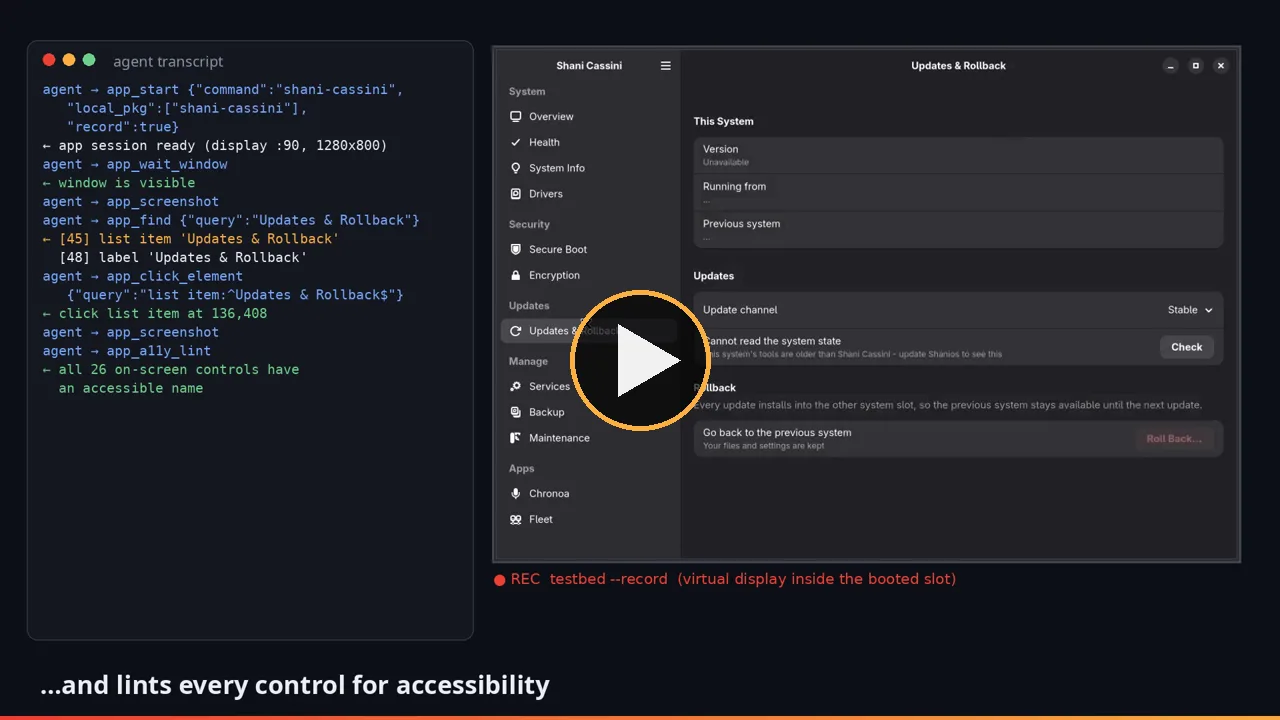
Click to play (MP4, 1 MB).
It chose every call itself. Condensed from the real transcript:
agent → harness_run {"command":"verify-boot","args":["blue","120"]}
        target reached : yes   ·   emergency mode : 0
agent → app_start {"slot":"blue","command":"shani-cassini","local_pkg":["shani-cassini"],"record":true}
agent → app_wait_window → app_screenshot
agent → app_find {"query":"Updates & Rollback"}
      ← [45] list item 'Updates & Rollback'   [48] label 'Updates & Rollback'
agent → app_click_element {"query":"list item:^Updates & Rollback$"}
      ← click list item 'Updates & Rollback' at 136,408
agent → app_screenshot → app_a11y_lint
      ← all 26 on-screen controls have an accessible name
agent → app_stop   (recording saved)
Eleven tool calls, four minutes. And then the part I did not ask for. From its report:
The log shows a version mismatch: the app runsshani-deploy --status, but the blue slot'sshani-deployrejects that option. As a result the page shows "Cannot read the system state" and the Version field reads "Unavailable".
That is a real bug in the combination: a newer Cassini against an older system image. The agent found it by reading the app's own log after the screen looked wrong — exactly what a careful human tester would do.
What I took from Chronoa's own driver
Chronoa, the assistant, has to drive other apps for its users, so it grew its own ui_driver. Four of its ideas are now harness actions (and MCP tools):
observe— a numbered view of the usable controls, so an agent picksclick-control=7instead of writing a regex. Fewer tokens, and a real path to a small local model driving the harness.- What appeared, what went — every click replies with the controls that came and went, so a click that did nothing is visible as such.
expect-field— reads the focused field back after typing, catching keystrokes the app dropped.click-text/wait-settle— OCR for windows with no accessibility tree, and waiting for the pixels to stop changing instead of asleepthat is either flaky or slow.
Writing your own check
The rule from the AGENTS.md files applies to the harness itself: if the check you need does not exist, add it to the harness rather than writing a one-off script beside it. A check in slot-tests/ runs under the same lock, in the same boot, with the same summary — and the next person gets it for free.
The contract
A boot-mode check is a Bash file in slot-tests/ whose first line after the shebang is:
# slot-test-mode: bootIt boots once, runs inside the slot, and prints one line per assertion:
RESULT <name> PASS|FAIL|SKIP <message>The name must contain no spaces, and the verdict must be the first token after the name. The aggregator matches ^RESULT [^ ]+ +PASS\b and the same for FAIL, so RESULT foo PASS (docker0 failed) is one pass and no failure. A test fails the run if its exit code is non-zero, if it prints any FAIL, or if it prints no PASS at all. SKIP is how a check says "this environment cannot answer the question" without pretending to pass.
A minimal check that can fail
Here is a complete one, slot-tests/var-volatile.sh, which asserts the /var contract that every nspawn-based check has to respect:
#!/bin/bash
# slot-test-mode: boot
#
# var-volatile — on a real boot /var is an empty tmpfs
# (systemd.volatile=state). Without --volatile, nspawn shows the
# image's /var and this check must say so rather than pass.
set -u
res() { printf 'RESULT %-30s %s\n' "$1" "$2"; }

fstype=$(findmnt -n -o FSTYPE /var 2>/dev/null || true)
if [[ "$fstype" == tmpfs ]]; then
  res var-volatile "PASS /var is a tmpfs"
else
  res var-volatile "FAIL /var is '${fstype:-not mounted}', expected tmpfs - run with --volatile"
fi
Run it both ways:
# must FAIL, and say why
./run_in_container.sh build.sh test slot-test blue var-volatile

# must PASS
./run_in_container.sh build.sh test slot-test blue var-volatile --volatile
That pair is the whole discipline. A check you have only ever seen pass is not evidence; it is a check that has not been tested. The harness applies the same idea to its own tests with tools/mutate.py, which breaks the code on purpose and requires the named check to fail.
If the check is about a GUI
Use the app actions rather than the accessibility tree directly: --a11y-lint for names, --expect-text for OCR, --expect-same / --expect-changed for visual state, --expect-clean-log for GTK/Qt criticals. If you need a new action, add it to lib/app.sh, expose it in the MCP server, and add it to the parity test — otherwise the next tests/mcp-parity.sh run will (correctly) fail.
Keep the furniture in sync
Three generated things will tell you when you forget:
tools/gen_readme.pyrebuilds the README's command, MCP-tool and slot-test tables from the dispatcher,usage.sh, the server's tool list and the slot-test headers.tests/readme-generated.shfails when those tables are stale.tests/mcp-parity.shfails when a command or action has no tool.
That is not bureaucracy. The README once described commands that no longer existed, and the MCP server once offered half the actions, because both were maintained by hand.
When it goes wrong
| Symptom | Likely cause | What to do |
|---|---|---|
another harness run holds ... and exit 75 | another command (or a leaked background child) holds the disk lock | wait for the pid in the message, or stop it; deleting the lock file will not help, the lock lives on the open descriptor. status still works. |
upgrade fails with "no internet" or every download fails "after 0 ms" | serve is not running, or the CA was never minted/trusted | run ca before bootstrap, keep serve up in a second terminal |
upgrade has nothing to do | no release published for serve to hand out | ./build.sh release -p <profile> latest; for a real version change, build again first |
verify-boot cannot explain a failed unit | some units fail or start without a console line | probe <slot> --exec="systemctl --failed --no-pager -l" |
slot-test dies with "header has no '# slot-test-mode: boot'" | the file is not a boot-mode check | add the header, or run it through enter/probe instead |
slot-test FAILED but no FAIL line in the output | the name has spaces, the verdict is not the first token, or the test printed no PASS | use res(), one word for the name, PASS/FAIL first |
a /var check behaves differently than on hardware | plain nspawn mounts the image's /var | add --volatile to the slot-test run |
status shows loops or overlays still mounted after a crash | a killed run left mounts behind | clean unmounts and detaches; it keeps the images |
qemu warns and boots an empty disk | it fell back to root.img/esp.img because install.img is absent | run bootstrap (or install + configure) first |
an OVMF/TPM boot fails with TPM result for CMD_INIT: 0x101 | overlapping ISO runs corrupted the swtpm state — the reason the lock exists | iso-install --boot-only --reset-firmware to start from fresh NVRAM and TPM |
| an agent cannot find the install repo | the checkouts are not siblings and SHANI_INSTALL_MEDIA is unset | set SHANI_INSTALL_MEDIA, or move the checkouts side by side |
Bugs only running it for real could find
None of these was visible by reading the code. Each was found by running the thing.
Every MCP GUI tool failed with "Permission denied." The app session listens on a FIFO created by root inside the container. The server opened it with Python's open(path, "w"), which adds O_CREAT — and with fs.protected_fifos=1, the kernel refuses an O_CREAT open of a FIFO owned by another user in a sticky, world-writable directory. The fix is one line: os.open(path, os.O_WRONLY). The interesting part is that nothing about the code looked wrong.
OCR had been comparing against an empty string. expect-text takes a screenshot, upscales it 2x and runs tesseract. On a display larger than the app's window — which is every run — tesseract 5.5.3 returned nothing for the full image, while the same pixels cropped to the window read perfectly. So expect-text failed even when the text was plainly on screen. OCR input is now cropped to the app's windows first.
A check that measured nothing. The new parity test extracted action names with a pattern that had no digits in it, so it never checked a11y-lint. It passed. It was found by the next tool.
Tests for the tests
A test that cannot fail is worse than no test: it tells you something is covered when it is not. The harness has had those — a power-cut check that reported PASS for a write that never happened — so two tools from Chronoa came over this week.
tools/mutate.py breaks the code on purpose and requires the named test to fail. Each mutation is an exact-once text replacement, restored in a finally, with a journal so a killed run is put back by the next one and a lock so two runs cannot overwrite each other's restore. The five sets so far:
[boot_default_entry_id] 1/1 caught   shani-deploy writes the slot stem, not the entry id
[boot_failure_timing]   2/2 caught   the failure check and the rollback timer swap order
[lock_release]          1/1 caught   the system bus inherits the disk lock again
[mcp_parity]            4/4 caught   the server drops a command, a tool, recording
[readme_generated]      2/2 caught   the code changes under the README
10/10 mutations caught across 5/5 sets measured
Its first run is what found the digit bug above.
tools/gen_readme.py rebuilds the README's reference tables — commands, MCP tools, slot tests — from the dispatcher, usage.sh, the server's tool list and the slot-test headers, and tests/readme-generated.sh fails when they are stale. On its first run it caught a formatting inconsistency in lib/usage.sh: four commands (verify-boot, slot-test, update-check, iso-install) do print in testbed --help, but their lines do not match the parser's shape — three use a single space after the command where the rest of the file uses two, and slot-test is not indented at all — so their table rows say no line in lib/usage.sh and carry no arguments or description.
What's next
The next step is the one Chronoa itself exists for: a small local model, not a frontier model in the cloud, driving this harness well enough to be useful. A numbered observe view and a "what changed" reply after every action are the first two pieces of that. The harness will tell me whether they are enough — by running it.
Everything is open source under shani8dev. Start with test help, run one verify-boot, add one check, and hand it to an agent. The first real bug it finds will be one you would not have seen by reading the code.